What you have, where it sits, what it is worth, and when it is ready to open. Cellar Pro keeps a serious collection in order on your iPhone and iPad, privately.
7-day free trial·then $4.99 a month or $29.99 a year·or $49.99 once
No accounts, no analytics
Works offline
Export anytime: JSON & CSV
Living Room RackRow 3 · Column 2
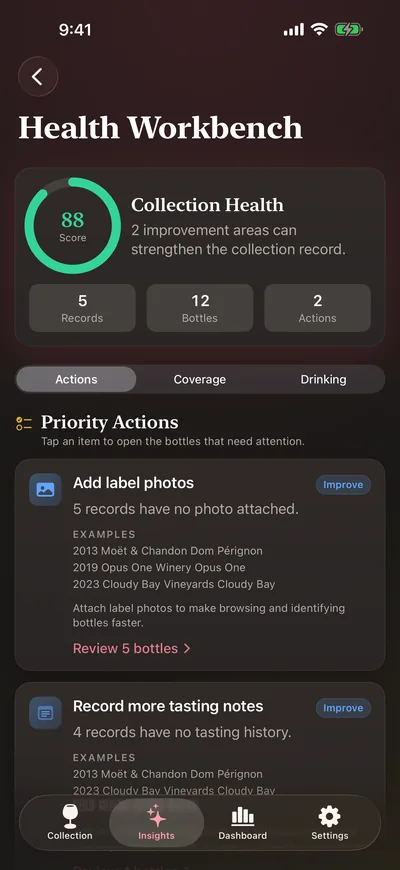
Health score 882 quick fixes left
Wine and spirits
Vintage and varietal for wine; age statement, cask and proof for spirits.
iPhone and iPad
One universal app, plus widgets and an Apple Watch companion.
Your iCloud
Optional sync through your own Apple ID. No sign-up.
Your data
Full JSON backup, CSV export and batch import from other apps.
What it does
Everything a cellar needs. Nothing it doesn’t.
Cellar Pro links each bottle record to the questions collectors actually ask when they buy, store, open and insure.
A record worthy of the bottle
Catalogue wine and spirits with the fields that matter to each. Producer, vintage, region and varietal for wine. Distillery, age statement, cask, mash bill, proof and fill level for spirits. Add photos, ratings and quantity.
Vintage
Region
Varietal
Age statement
Cask
Proof
Fill level
Scan a label, or a barcode
Point the camera at a label and on-device text recognition picks out the producer, name and vintage. Or scan a barcode to look the product up on Open Food Facts. You always review the details before saving.
Drinking windows that remind you
Set drink-from, peak and drink-by years. Get an alert ahead of each peak and drink-by date, plus an optional weekly digest of what is ready.
A map of your racks
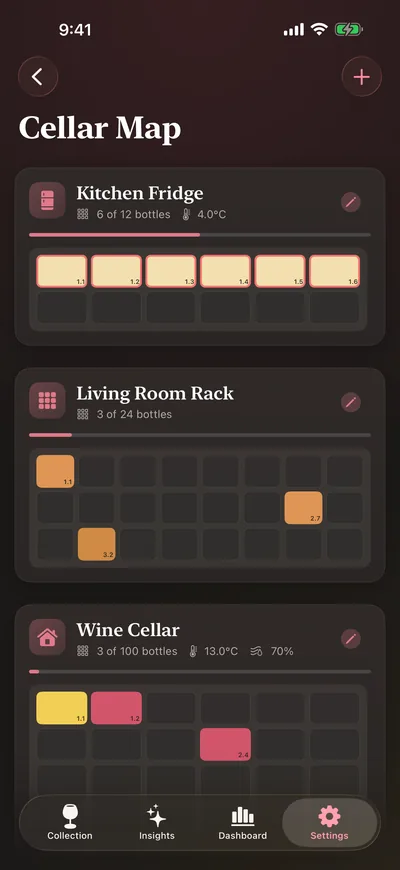
Model each cellar, fridge or rack as a grid. Every bottle gets a row, column and bin, so finding it takes seconds.
Storage climate log
Record temperature and humidity for each location and see recent averages. Cellar Pro alerts you when a reading falls outside the ideal range.
Tasting notes, done properly
Structured notes with an aroma picker and ratings, plus food pairing ideas for each bottle. Run a blind tasting with friends and reveal the bottles at the end.
Value and insights
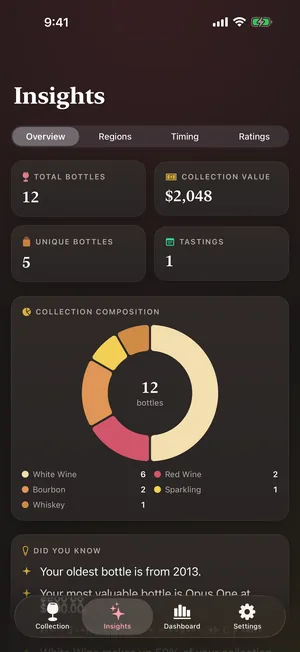
Compare purchase price with current value and follow it over time. Break the collection down by type, region, timing and rating. Price lookup links open Vivino, Wine-Searcher, Wine.com or CellarTracker.
Collection health workbench
A single score for how complete your records are, with a to-do list: missing photos, values and locations, duplicates and drinking-window gaps.
Bring your cellar with you, and take it anywhere
Batch import bottles from a CSV file, a CellarTracker or Vivino export, or the clipboard. Export a full JSON backup with bottles, locations, tastings, consumption history and photos, then restore it whenever you need. CSV export is there for spreadsheets and insurers.
Home Screen, Lock Screen and wrist
Widgets show bottle count, value and what is ready to drink. The companion Apple Watch app gives you a quick summary of your collection. Optional iCloud sync keeps your iPhone and iPad in step.
How it works
From the case to the glass.
A cellar record is only useful if it stays accurate. Cellar Pro is built for the whole life of a bottle.
Add
Scan a label, look up a barcode, import a list, or enter a bottle by hand when it needs care.
Place
Put it in a location and a slot on the cellar map, so the record matches the rack.
Decide
Drinking-window alerts, ratings and pairings tell you what to open tonight and what to keep.
Maintain
Log what you drank, fix gaps in the health workbench, and keep a backup for peace of mind.
A closer look
Designed for decisions, not just data entry.
Every screen answers a question worth asking, from where a bottle is to what your cellar is worth.
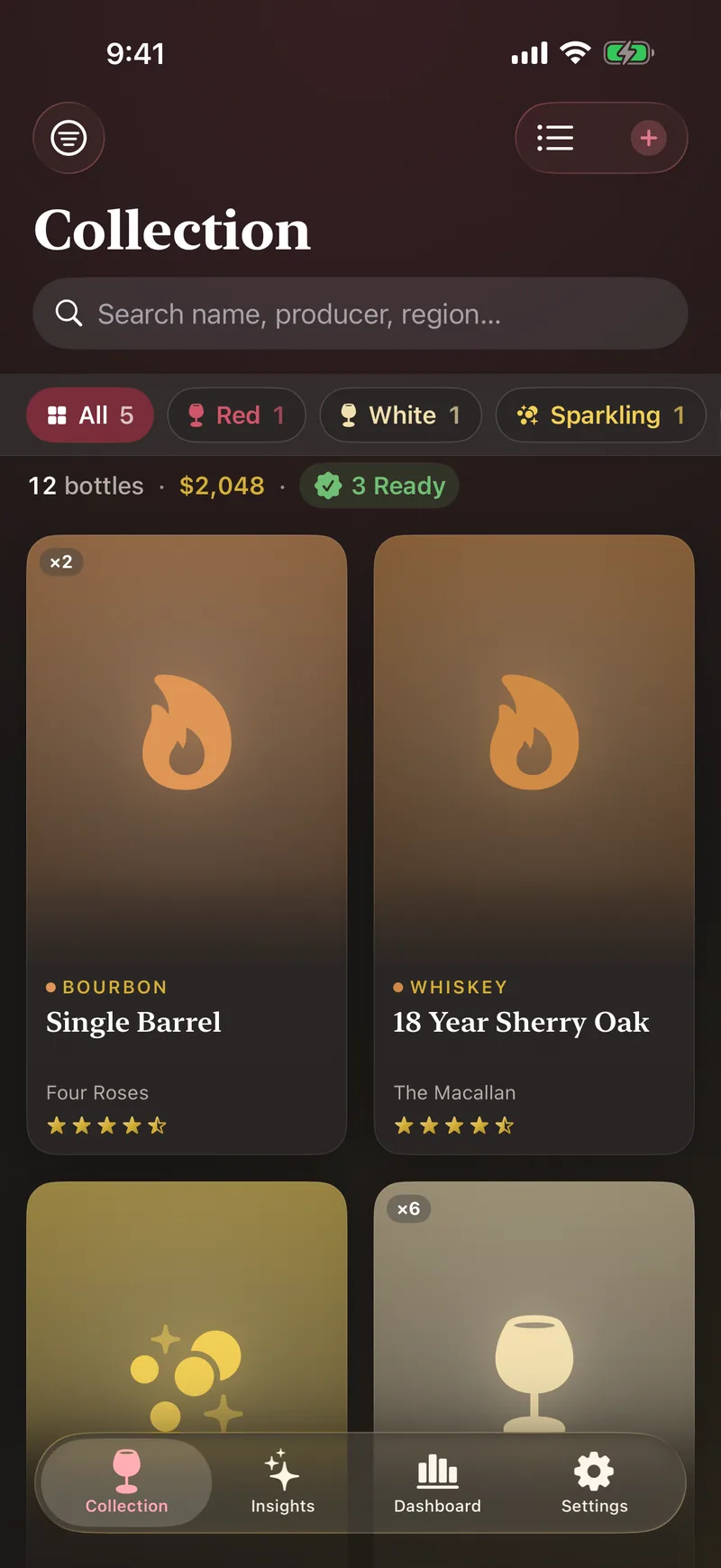
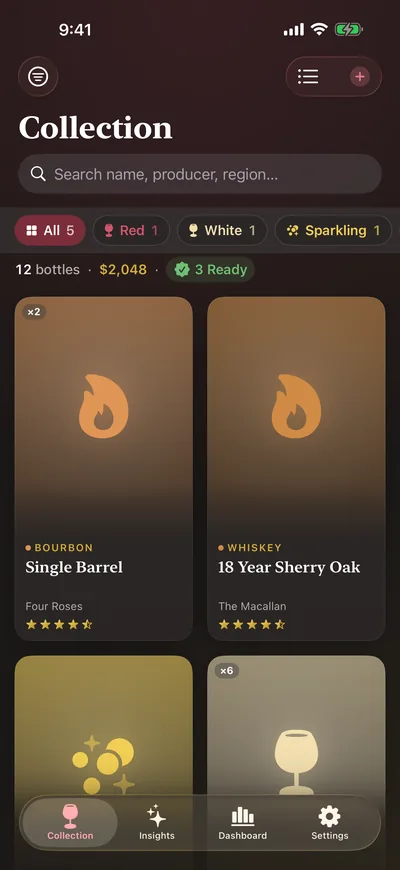
The whole collection
Search, filter and sort. Each card shows producer, vintage, rating and how many you hold.
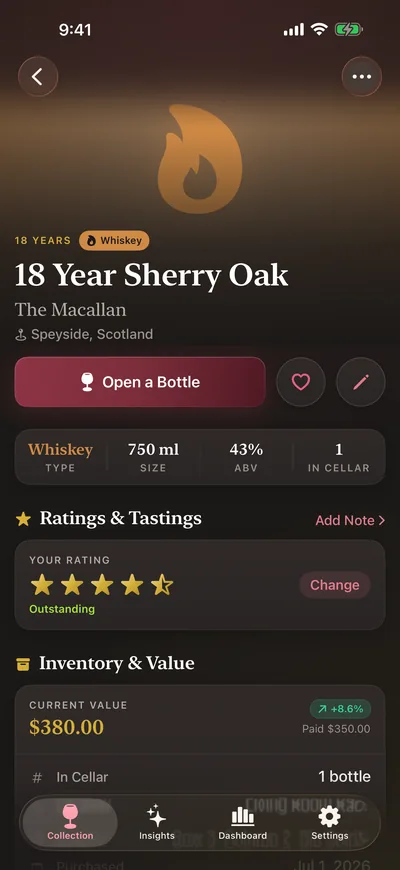
Every detail, in one place
Type, size and ABV up top, with location, rack position, price and current value right below.
See where it sits
Each location is a grid. Filled slots are coloured by type, with temperature and humidity alongside.
Find gaps early
A health score and a short list of fixes, such as adding label photos to records that lack them.
Know your collection
Totals, value and composition, with tabs for regions, timing and ratings.
Swipe to see more screens
Private by design
Your cellar is nobody else’s business.
No accounts, no analytics, no tracking. Your collection never touches our servers. It lives on your device and, if you choose, in your own private iCloud.
Local first. Bottles, notes, values and photos are stored on your device.
Your iCloud, your Apple ID. Sync is optional and uses your private iCloud database. There is no Cellar Pro sign-up.
On-device scanning. Label text recognition runs on your iPhone or iPad. Images are never uploaded.
Optional App Lock. Require Face ID, Touch ID or your passcode to open Cellar Pro on that device.
One clear exception. Barcode lookup sends only the barcode number to Open Food Facts, and only when you scan one.
Pricing
One app. Every feature. Three ways to pay.
No free tier and no ads. Every plan unlocks the same complete app. You can explore a read-only sample cellar in the app before you buy.
Monthly
$4.99 / month
Free for 7 days
Flexible access, month to month.
7-day free trial for eligible Apple IDs
Renews monthly until you cancel
Every feature included
Free trial at launch
Yearly
Save 50%
$29.99 / year
About $2.50 a month · free for 7 days
Best value for a cellar you keep all year.
7-day free trial for eligible Apple IDs
Half the price of 12 monthly payments ($59.88)
Every feature included
Free trial at launch
Lifetime
Pay once
$49.99 once
No subscription, no renewals
A single purchase that unlocks Cellar Pro permanently.
One-time App Store purchase
Restore on any iPhone or iPad with your Apple ID
No free trial
Available at launch
Every plan includes
Unlimited bottles, wine and spirits
Label scanning and barcode lookup
Cellar map and storage climate log
Drinking windows and reminders
Tasting notes and blind tastings
Value tracking and insights
Collection health workbench
JSON backup, CSV export, batch import
iCloud sync, widgets and Apple Watch app
Prices are in US dollars. The App Store sets local prices, which may vary by region. The free trial applies to new subscribers with an eligible Apple ID. Subscriptions renew automatically at the plan price unless cancelled at least 24 hours before the end of the current period, and you can manage or cancel them in your Apple account settings. Purchases are not available through Family Sharing. See the Terms of Use and Privacy Policy.
Questions
Before you buy
Is there a free version of Cellar Pro?
No. Cellar Pro is a paid app with no free tier and no ads. Before you buy, you can open a read-only sample cellar in the app, and Monthly and Yearly start with a 7-day free trial for eligible Apple IDs.
What happens when the free trial ends?
Your subscription starts automatically at the plan price unless you cancel at least 24 hours before the trial ends. You can cancel in Settings, then your name, then Subscriptions on your iPhone or iPad.
Do all plans include the same features?
Yes. Monthly, Yearly and Lifetime unlock exactly the same app. The only difference is how you pay. Purchases are not shared through Family Sharing.
Where is my collection stored?
On your device. If you turn on iCloud sync, it is also stored in your own private iCloud account. There is no Cellar Pro account, no analytics and no tracking, and your collection never touches our servers.
Can I get my data out, or bring it in?
Yes. Export a full JSON backup with bottles, locations, tasting notes, consumption logs and photos, and restore it later. Export bottles to CSV for spreadsheets. Batch import bottles from a CSV file, a CellarTracker or Vivino export, or the clipboard.
Does Cellar Pro work offline?
Yes. Your collection lives on the device, so browsing, editing, label scanning and tasting notes all work without a connection. Barcode lookup, price lookup links and iCloud sync need a connection.
What do I need for the Apple Watch app?
An Apple Watch on watchOS 10 or later, paired with an iPhone running Cellar Pro on iOS 17 or later. The Watch app is a companion that shows a summary sent from your iPhone.